The quickest way to translate a menu is to point your phone’s camera at it. On iPhone you can use Live Text in the Camera app or the Translate app. On Android, Google Lens and Google Translate both translate through the camera. And an AI app such as Image Identifier can translate the menu and then answer questions about the dishes.
On iPhone: Live Text or the Translate app
- Open the Camera app and point it at the menu.
- When a frame appears around the text, tap the Live Text button.
- Tap Translate to see the menu in your language.
Live Text translation needs iOS 16 or later and works for the languages Apple supports. You can also open Apple’s Translate app and use its Camera tab, or translate a photo you have already taken from the Photos app.
On Android: Google Lens or Google Translate
- Open the Google Translate app and tap Camera.
- Choose the menu’s language, or let the app detect it, and your own language.
- Point at the menu to see the translation on screen, or take a photo to translate the whole page.
Google Lens offers the same thing through its Translate option, and many Samsung phones also include camera translation through Bixby Vision.
With an AI app: translate, then ask about the dishes
Camera translators are great for reading the words, but dish names often don’t translate literally. With an AI app like InfoLens Image Identifier you can take a photo of the menu, ask for a translation and then keep asking questions: “What is in this dish?”, “Which of these are vegetarian?” or “What would you recommend for someone who doesn’t like spicy food?”
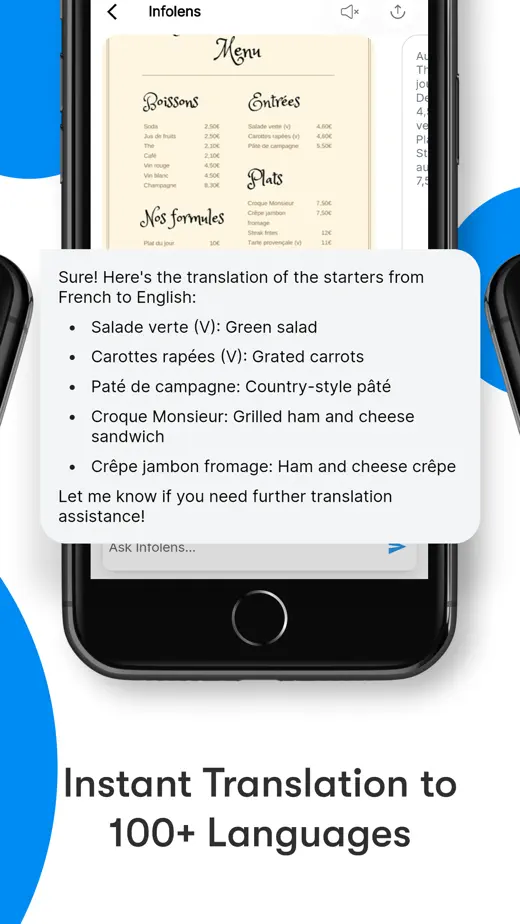
Try it with Image Identifier
Free to download on iPhone and Android. It translates into more than 100 languages and lets you ask follow-up questions in the same chat.
Tips for a better translation
- Hold the phone flat above the menu and avoid glare from lights or windows.
- Photograph one section at a time rather than the whole menu at once.
- Handwritten boards and decorative fonts are harder for every app to read, so try a closer photo.
- If a translation looks odd, ask what the dish is rather than trusting a word-for-word result.
Allergies and dietary needs
Never rely on a translation app to check for allergens. Translations can miss ingredients or get them wrong. If you have an allergy, carry a written card in the local language and ask the staff to confirm before you order.
Common questions
Can I translate a menu without an internet connection?
Yes, if you prepare first. Google Translate and Apple’s Translate app both let you download languages to use offline.
Can I translate a photo of a menu I took earlier?
Yes. Use Live Text in the Photos app on iPhone, Google Lens on Android, or upload the photo to Image Identifier.
Which app is the most accurate?
All of them handle clearly printed menus well. If one result looks strange, try another app or ask the staff.
Can I translate what the waiter says?
A voice translator can help. See our guide to using a live voice translator.