InfoLens Image Identifier
Translate text from an image
Take a photo of a menu, sign, label or letter, ask for a translation, and Image Identifier gives you the text in your language. It translates into more than 100 languages and can explain what the text means.
★ 4.2 on Google Play from 811 reviews · 50K+ downloads · Free to download
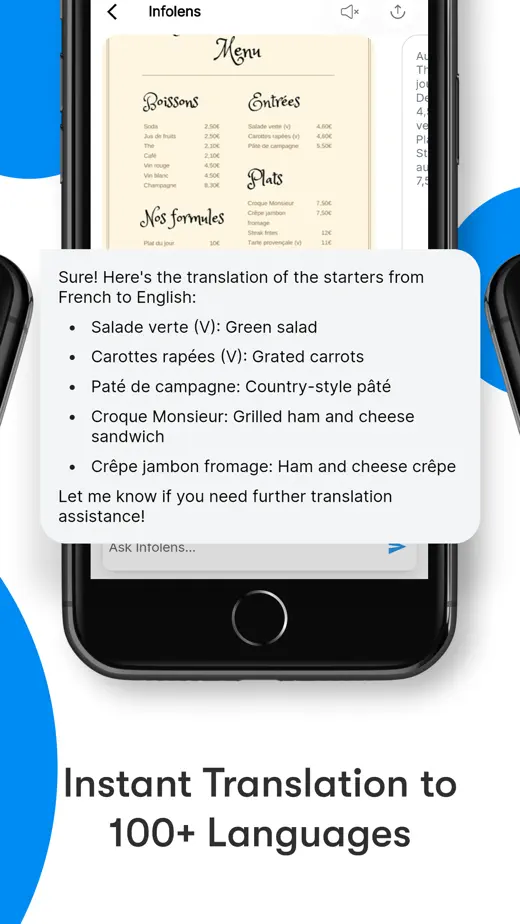
How to translate a photo
- Take a photo of the text, or upload a screenshot.
- Ask “Translate this into English”, or into any other language.
- Read the translation, then ask for an explanation of anything unclear.
- Ask follow-ups such as “Which dishes are vegetarian?” or “What does this sign mean for drivers?”
Questions to try
- Translate this menu into English
- What does this sign say?
- Translate this label into Spanish
- Summarize this letter in English
- Explain this phrase in simple words
Good to know
- Handwriting, decorative fonts and blurry photos are harder to read.
- Machine translation can miss nuance. For legal, medical or official documents, use a professional translator.
- Never rely on a translation to check for allergens or medication instructions. Ask staff or a pharmacist.
Common questions
How many languages does it support?
Image Identifier translates into more than 100 languages.
Can it translate a screenshot?
Yes. Upload any screenshot or photo from your gallery.
How is it different from a camera translator?
Besides translating the text, Image Identifier lets you ask follow-up questions about what it means in the same chat.
More ways to use Image Identifier
Plants
Identify a plant from a photo
Snap a leaf, flower or tree and get its likely name, then ask how to look after it.
Objects
Identify an object from a photo
Find out what an unfamiliar object, gadget or part is and what it is used for.
Documents
Read text from an image
Turn a photo of a letter, receipt or screenshot into text you can question, summarize or list.
Read the world in your language
Free to download on iPhone and Android.